godocs Architecture Diagrams
This directory contains architecture diagrams for godocs created using D2, a modern diagram scripting language.
Available Diagrams
Document Ingestion Flow
Files:
- Source: ingestion-flow.d2
- SVG: ingestion-flow.svg
- PNG: ingestion-flow.png
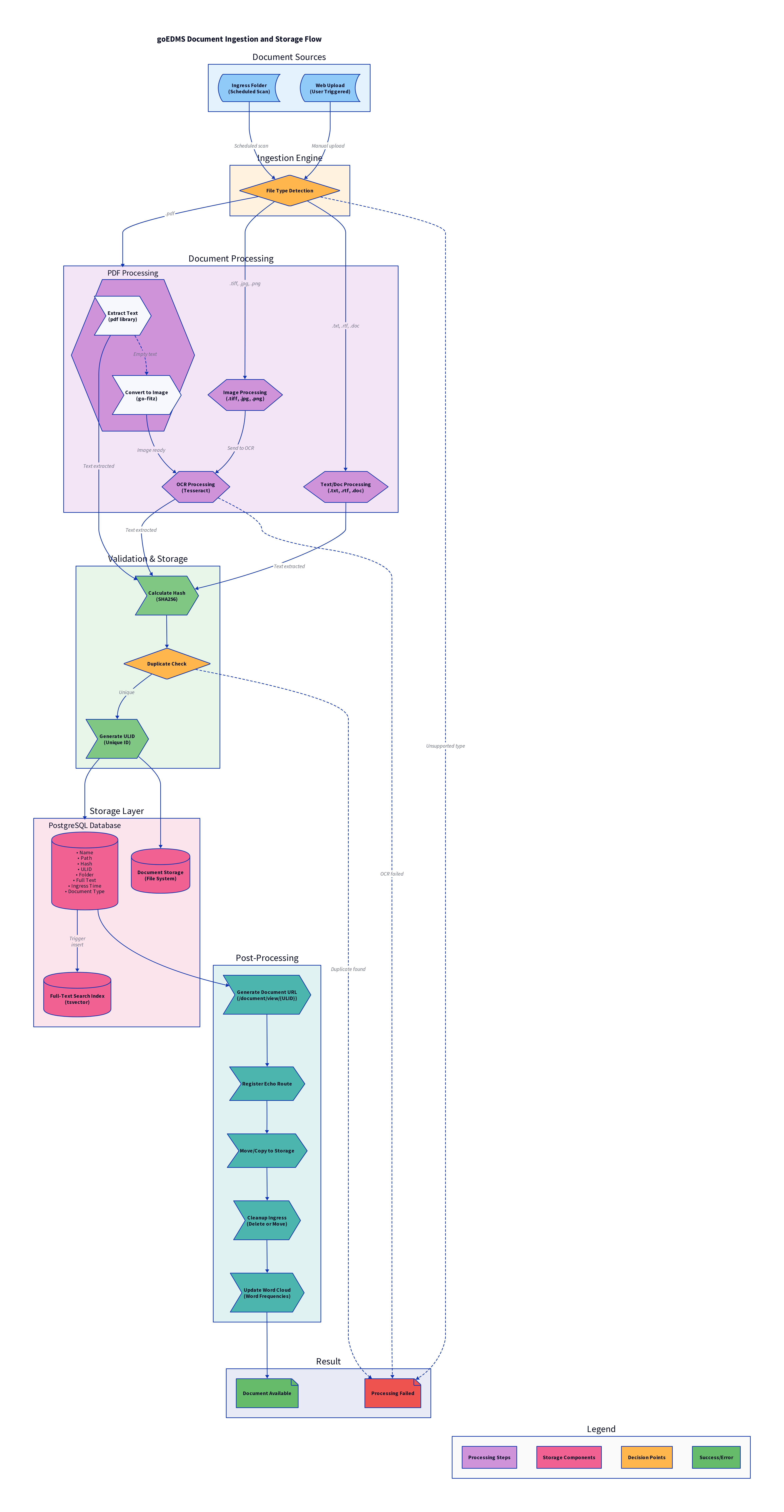
Description: This diagram illustrates the complete document ingestion and storage pipeline in godocs, including:
-
Document Sources
- Ingress folder (scheduled scanning)
- Web upload (user-triggered)
-
Processing Pipeline
- File type detection
- PDF text extraction
- OCR processing for scanned documents and images
- Text/document format handling
-
Validation
- SHA256 hash calculation
- Duplicate detection
- ULID (Universally Unique Lexicographically Sortable Identifier) generation
-
Storage
- PostgreSQL database for metadata
- File system storage for documents
- Full-text search indexing (tsvector)
-
Post-Processing
- URL generation and route registration
- File organization
- Ingress cleanup
- Word cloud updates
Regenerating Diagrams
Prerequisites
Install D2:
# Using go install
go install oss.terrastruct.com/d2@latest

# Or using curl script (Linux/macOS)
curl -fsSL https://d2lang.com/install.sh | sh -s --
Generate SVG (Recommended for Web)
d2 docs/ingestion-flow.d2 docs/ingestion-flow.svg
SVG files are:
- Vector-based (scalable without quality loss)
- Small file size (~65KB)
- Best for documentation and web pages
Generate PNG (For Presentations)
d2 docs/ingestion-flow.d2 docs/ingestion-flow.png
PNG files are:
- Raster-based (fixed resolution)
- Larger file size (~1.8MB)
- Better for presentations and offline viewing
Note: PNG generation requires Chromium/Playwright, which D2 will download automatically on first use (~166MB).
Generate with Different Themes
D2 supports multiple themes:
# Neutral theme (default)
d2 --theme=0 docs/ingestion-flow.d2 docs/ingestion-flow.svg

# Dark theme
d2 --theme=200 docs/ingestion-flow.d2 docs/ingestion-flow-dark.svg

# Cool classics
d2 --theme=1 docs/ingestion-flow.d2 docs/ingestion-flow-cool.svg
Generate with Different Layouts
# ELK layout (hierarchical, good for flows)
d2 --layout=elk docs/ingestion-flow.d2 docs/ingestion-flow-elk.svg

# TALA layout (D2's default, force-directed)
d2 --layout=tala docs/ingestion-flow.d2 docs/ingestion-flow-tala.svg

# Dagre layout (hierarchical, compact)
d2 --layout=dagre docs/ingestion-flow.d2 docs/ingestion-flow-dagre.svg
D2 Syntax Overview
The ingestion flow diagram uses several D2 features:
Containers
processing: {
  label: "Document Processing"
  pdf_proc: {
    label: "PDF Processing"
  }
}
Connections
source -> destination: "Label"
source -> destination: "Error case" {
  style.stroke-dash: 3  # Dashed line
}
Shapes
database: {shape: cylinder}
decision: {shape: diamond}
process: {shape: hexagon}
file: {shape: page}
Styling
element: {
  style.fill: "#ff0000"      # Background color
  style.stroke: "#00ff00"    # Border color
  style.font-size: 24        # Font size
  style.bold: true           # Bold text
}
Best Practices
- Keep source files in version control - The
.d2source files are small (~5KB) and should be committed - Generate outputs as needed - SVG/PNG files can be regenerated from source
- Use SVG for documentation - Better quality and smaller size for web viewing
- Document diagram changes - Update this file when adding new diagrams
- Test rendering - Always regenerate after editing
.d2files to verify syntax
Resources
- D2 Documentation
- D2 Playground - Test diagrams online
- D2 Examples
- D2 GitHub
Future Diagrams
Planned diagrams to add:
- System architecture overview (frontend, backend, database)
- Search query flow
- Word cloud generation process
- User authentication and authorization flow
- Deployment architecture (Docker, Kubernetes)